At its most basic, a panic button is a direct line to help when you need it most. When someone activates it, the lone worker app fires off an immediate distress signal to a monitoring center. It’s like a digital flare gun, instantly telling responders who you are, where you are, and that you’re in trouble.
That simple press of a button sets off a well-orchestrated chain of events designed to get assistance to you as quickly as possible.
How a Panic Button Alert Actually Works
To really get how a panic button works, it’s helpful to think of the process in three key stages: the trigger, the transmission, and the response. It’s a lot like a relay race for your safety. The trigger starts the race, the transmission carries the message down the track, and the response team crosses the finish line by delivering help.
This simple yet powerful process has become a cornerstone of modern safety protocols. For a deeper dive into how these devices are used in professional environments, this complete guide to panic buttons for staff safety is a great resource.
The Core Components of an Alert
The entire alert process kicks off the moment a user activates their device. This isn’t always a deliberate button push; many modern systems can also be triggered automatically by things like a fall (man-down) or a prolonged period of no movement.
The real job of any panic system is to close the distance between a person in crisis and the help they need, turning a chaotic moment into a coordinated, effective response.
Once an alert is triggered, the device immediately bundles up critical information—like the user’s ID, their exact GPS location, and the type of alert—and sends it out. This signal travels over a communication network, whether it’s cellular, Wi-Fi, or even satellite, to find its way to a monitoring center. If you’re managing teams in the field, you might find our article on what defines a lone worker alert particularly useful.
The signal’s final stop is almost always a professional monitoring center staffed by trained agents. These experts receive the alert, verify the emergency to filter out false alarms, and then coordinate directly with local first responders to dispatch the right kind of help to the right location.
To make this clearer, let’s break down the triggers and communication methods in a simple table.
Panic Button Triggers and Transmissions at a Glance
| Component | Description | Common Examples |
|---|---|---|
| The Trigger | The initial event that activates the alert. It can be manual or automated. | Manual SOS press, fall detection (man-down), no-motion timer, duress code. |
| The Transmission | The method used to send the distress signal from the device to the monitoring center. | Cellular (4G/5G), Wi-Fi, Bluetooth Low Energy (BLE), Satellite. |
This table shows how different activation methods pair with various communication technologies to create a reliable safety net.
From Niche Tool to Global Market
Panic buttons have come a long way since they first appeared in the 1970s as personal emergency response systems (PERS) mainly for seniors. Today, they’re indispensable tools for protecting lone workers, and solutions like Gameo Pro are even turning everyday smartphones into powerful safety devices.
This shift is reflected in the market’s explosive growth. The global medical alert systems market was valued at USD 10.27 billion by 2025 and is on track to reach a staggering USD 28.63 billion by 2035, showing just how vital these tools have become.
The Anatomy of a Modern Panic Alert
When you hear “panic button,” you probably picture that classic red button tucked under a bank teller’s counter. While those still have their place, the reality of modern panic alert systems is far more sophisticated and, frankly, much smarter. Today’s systems understand a crucial fact: a real emergency rarely gives you a calm moment to find and press a button.
It’s a lot like a modern home security system. You wouldn’t rely on a single sensor on your front door, right? You have sensors for windows, motion detectors for hallways, and maybe even glass-break detectors. Each one is purpose-built for a specific type of threat. Panic alerts work the same way, layering different kinds of triggers to create a complete safety net.
These triggers are the system’s “senses,” and they’re the key to understanding how these devices really function.
Manual Triggers: The Classic SOS
The most direct way to signal for help is with a manual trigger. This is when a person actively and deliberately sends an alert because they know they’re in trouble. It sounds simple, but how it’s done can look very different depending on the person’s job and the device they have.
- Physical Buttons: You’ll find these on dedicated wearable fobs or badges. They’re designed for a quick, tactile press—something you can do by feel without fumbling for a screen.
- Smartphone App Buttons: An app like Gameo Pro essentially turns the phone in your pocket into an advanced safety device. Open the app, hit the digital SOS button, and an alert is sent instantly.
- Duress Codes: This is an incredibly smart feature for high-risk scenarios. If an employee is forced to disarm a system, they can enter a special PIN. To the aggressor, it looks like the system is off, but it has silently dispatched an emergency signal to the monitoring center.
This flexibility is key. It means no matter the device, an employee has a direct line to help.
Automated Triggers: A Proactive Safety Net
This is where modern systems truly shine. They can automatically call for help even when the worker is physically unable to. Using sensors like accelerometers and gyroscopes—the same ones already in our smartphones and wearables—these systems can detect the tell-tale signs of an accident or medical emergency.
A modern panic alert is more than a button; it’s a proactive safety net designed to detect distress even when a person can’t ask for help. It transforms a reactive tool into a guardian that is always on watch.
This automated layer is what provides genuine peace of mind, especially for anyone working alone or in hazardous conditions. The two most common automated triggers are “man-down” and “no-motion” alerts.
How Automated Alerts Work
Man-Down (Fall Detection): This feature is constantly watching for the specific physics of a fall—a sudden, sharp impact followed by a change in the device’s orientation. If a worker slips off a ladder or collapses, the device recognizes the event. It will typically start a short pre-alert countdown, giving the person a chance to cancel if they just dropped their device. If they don’t respond, help is summoned automatically.
No-Motion Alerts: These are built for the scary situations where someone becomes incapacitated without a fall, like being overcome by toxic fumes or having a silent medical event. If the device detects zero movement for a set period (say, 2-3 minutes), it starts a timer. If the worker doesn’t move or dismiss the warning prompt on their screen, the system assumes the worst and sends an alert.
By combining these manual and automated triggers, you get a system that’s truly robust. It empowers workers to call for help when they can, and acts as a vigilant partner to call for them when they can’t. This is the core evolution that defines how modern panic buttons truly work.
From Signal to Safety: The Emergency Response Workflow
The moment a panic button is activated, a critical sequence of events kicks into gear. Think of it as a digital emergency flare. But instead of just shooting up into the sky for anyone to see, this flare travels through a precise network, delivering a detailed message to the exact people who can help. This entire process is what turns a simple button press into a potentially life-saving response.
It all starts with the device itself. Using whatever connection it can find—cellular, Wi-Fi, or even a satellite link in remote areas—it sends out its alert package. This isn’t just a generic “help!” signal. The data packet is packed with context: the user’s ID, their precise GPS location, the type of alert (was it a manual push, a fall, or something else?), and other vital information.
The infographic below shows how different triggers can set this workflow in motion.
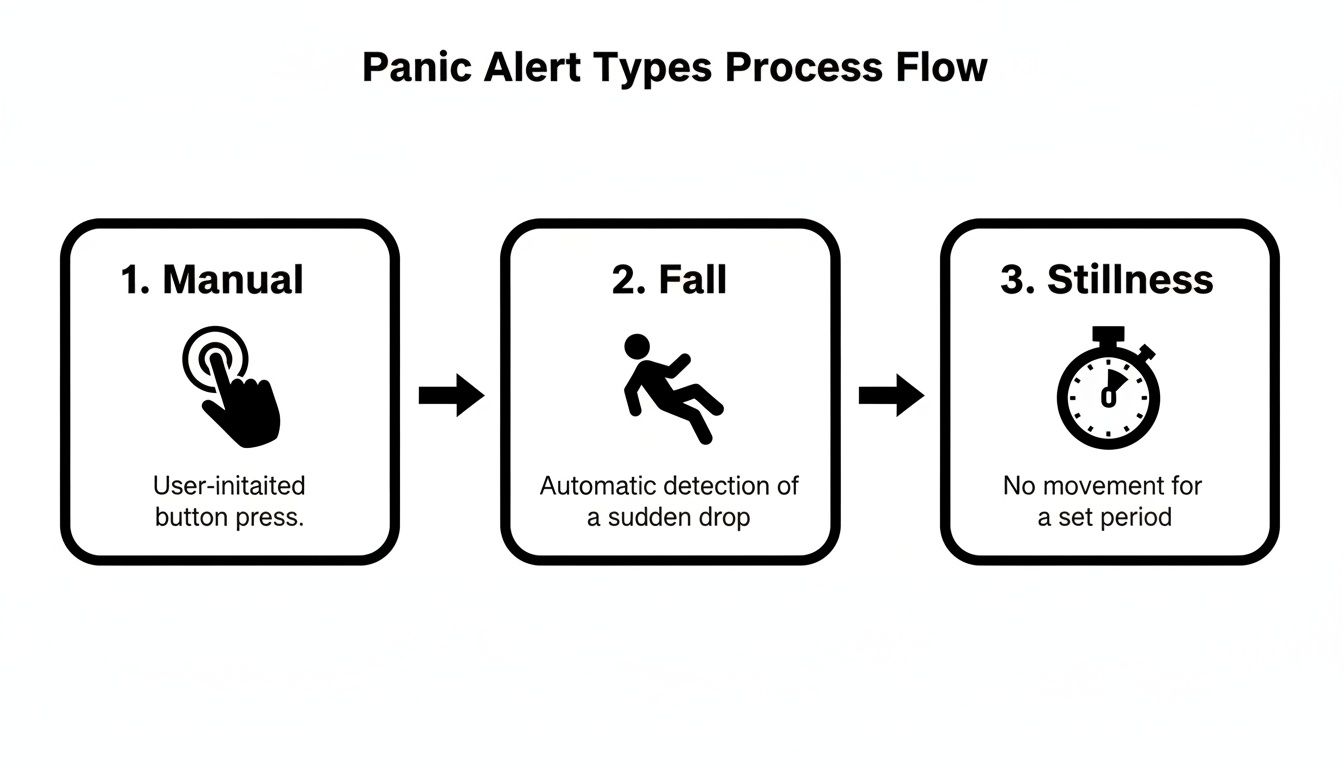
As you can see, modern systems provide multiple layers of protection. From a deliberate call for help to automated safeguards, an alert can be sent no matter the circumstances.
The Human-in-the-Loop: The Monitoring Center
This alert signal isn’t just sent to a manager’s phone. Its destination is almost always a professional, 24/7 emergency response center. This is the single most important feature that separates a true safety solution from a basic alarm that just texts a colleague. These centers are staffed by highly trained agents whose only job is to manage and verify incoming alerts.
An automated system can miss the nuances of a real-world situation, but a human agent can start assessing things immediately. When an alert hits their dashboard, they see all the critical information sent from the device. Their first step is always verification.
Is this a real emergency or a false alarm? The agent will follow a pre-set protocol, which usually involves trying to contact the user directly, often through a two-way call feature on the device or app. This step is crucial for filtering out accidental activations, preventing costly false dispatches and keeping emergency resources free for genuine crises. The role of tracking lone worker location is absolutely vital here, as it gives agents immediate spatial awareness.
From Verification to Dispatch
Once the agent confirms the emergency—or if they can’t get ahold of the user—the workflow kicks into high gear. The agent shifts from verifier to coordinator, acting as the bridge between the person in distress and local first responders.
The real power of a professional response workflow lies in its ability to give verified, context-rich information to first responders before they arrive. This intelligence turns a standard 911 call into a targeted and efficient rescue mission.
Using the pinpoint GPS data, the agent tells the nearest police, fire, or medical services exactly where to go. This is a world away from a panicked and disoriented person trying to describe their surroundings over the phone. To get a feel for how these structured processes work behind the scenes, it’s worth understanding the detailed emergency response workflows that guide an agent’s every move.
This seamless process is the hallmark of today’s smart safety systems, blending simple user triggers with powerful backend technology. Lone workers using apps like Gameo Pro can send alerts with geofenced GPS data and critical context directly to these trained agents. The market for these tools is growing fast; the global smart personal safety and security device market is projected to expand from USD 55,738.3 million in 2026 to an incredible USD 165,539.8 million by 2036.
Ultimately, this workflow is what makes a panic button more than just a piece of hardware. It’s a fully managed safety service, ensuring every alert is handled quickly, intelligently, and with the full context needed to make a difference when it matters most.
Integrating Panic Buttons into Your Safety Ecosystem
A modern panic button isn’t just a lonely device sending out a simple SOS. Think of it more like the nerve center of a complete safety ecosystem, linking your people not just to a response team, but to a whole web of smart technology built to keep them safe. This integration is what gives today’s safety solutions their real power.
An old-school alert was just a signal flare. An integrated alert, on the other hand, is a full intelligence briefing. When someone triggers an alarm, the system doesn’t just shout “Help!” It instantly gathers a complete picture of the situation, pulling in data from different sources to give responders a rich, real-time report they can act on immediately.
This leap in capability is a big reason these tools are catching on so fast. The global personal safety alarms market was valued at USD 90.2 million in 2023 and is expected to hit USD 158.9 million by 2032. That growth is being fueled by industries like construction and utilities, where companies are adopting platforms like Gameo Pro for live monitoring and total safety management. You can dive deeper into the numbers in this report on the personal safety alarms market.
The Power of Location Technology
One of the most important pieces of this puzzle is advanced location technology. It’s one thing to know an employee is in trouble; it’s another to know exactly where they are—down to the specific room on the third floor. To get that kind of accuracy, modern systems blend a few different technologies.
- GPS (Global Positioning System): This is your foundation for outdoor tracking. It gives you solid coordinates for anyone working in open areas, on remote job sites, or traveling between locations.
- Wi-Fi Mapping: Once a worker steps inside, GPS signals fade. The system then intelligently switches to mapping nearby Wi-Fi signals to get a solid fix on their indoor position, which is far more reliable than GPS alone.
- BLE (Bluetooth Low Energy) Beacons: For true pinpoint accuracy inside a building, you can place small, inexpensive BLE beacons in key areas. When an alert goes off, the employee’s device reports the closest beacon, telling responders their exact location in a complex floor plan.
By layering these technologies, you slash search times and ensure help arrives faster, no matter if the incident is in a field, a dense office building, or a sprawling warehouse.
Connecting to the Broader Safety Network
Beyond just finding someone, a truly integrated system plugs that panic alert into your other on-site tech and communication channels. This creates a coordinated, facility-wide response instead of a siloed one.
Integration transforms a reactive button press into a proactive, site-wide safety event. It ensures the right people get the right information instantly, turning a lone worker’s alert into a team-based response.
For example, when an alert is triggered through a platform like Gameo Pro, the system can be set up to automatically:
- Notify Nearby Coworkers: The system can ping other team members in the area, letting them know a colleague needs help so they can provide immediate aid if it’s safe.
- Alert the Site Control Room: If you have a security desk or control room, the alert appears directly on their dashboard with a live map and ongoing updates.
- Integrate with Building Systems: In more advanced setups, an alert can trigger other IoT devices. This could mean activating nearby security cameras or even unlocking specific doors to give first responders instant access.
This deep level of connectivity is a cornerstone of effective lone worker safety strategies, because it builds in redundancy and speeds up every single step of the response process.
Ultimately, a modern panic button solution is far more than a simple alert. It’s a proactive safety management tool that provides live monitoring dashboards, generates compliance-ready reports for audits, and enables mass communication to keep entire teams on the same page during a crisis. By weaving these elements together, you can elevate your duty of care from a basic obligation to a dynamic, intelligent safety culture.
Choosing the Right Panic Button Solution for Your Team
Picking the right panic button system is one of the most critical safety decisions you can make. This isn’t just about checking a compliance box. It’s about giving your people a tool they’ll actually trust and carry with them every day. The most advanced technology is worthless if it’s too clunky to use or gets left behind in a truck.
The key is to find a solution that fits the real-world situations your team faces. A one-size-fits-all approach almost never works. A social worker visiting clients in their homes faces entirely different risks than a technician working alone at a remote utility site.
Start with a Solid Risk Assessment
Before you even start looking at gadgets or apps, you have to get a clear picture of your team’s unique vulnerabilities. A thorough risk assessment is the bedrock of any good safety plan. This process is all about figuring out who is at risk, what those dangers are, and where they’re most likely to happen.
Your assessment should give you straight answers to these questions:
- Who is at risk? List out every single role that involves working alone, dealing with the public, or entering hazardous environments.
- What are the biggest threats? Are you worried about slips and falls, sudden medical events, or violence and verbal abuse? Workplace violence is a persistent issue, leading to over 700 fatalities in 2023, according to the BLS.
- Where do these incidents occur? Do your people work indoors, outdoors, underground, or in areas with spotty cell service? This detail will directly influence the technology you need.
Getting these answers first stops you from wasting money on features you don’t need and ensures you invest in a system that tackles your team’s real dangers.
Match the Solution to the Role and Risk
Once you have that foundation, you can start looking at the actual hardware and software. A common pitfall is thinking everyone needs a dedicated, physical button. While those are great for some jobs, modern smartphone apps offer incredible flexibility and are often the most practical choice.
The best panic button is the one an employee actually has with them when an emergency hits. For most people, that’s the smartphone already in their pocket.
Solutions like Gameo Pro can transform the device your team already carries into a powerful safety lifeline. This approach makes adoption much smoother. Getting your team protected can be as simple as having them scan a QR code, which eliminates a ton of deployment headaches.
To help you narrow down the options, we’ve put together a table comparing the most common types of panic button solutions.
Comparing Panic Button Solutions for Your Business
Choosing the right solution requires you to weigh the daily realities of your workers against the capabilities of the technology. This table breaks down the main options to help you see which might be the best fit for your organization.
| Solution Type | Best For | Key Advantages | Potential Limitations |
|---|---|---|---|
| Smartphone Apps | Mobile workforces, teams in urban/suburban areas, organizations seeking rapid deployment. | Cost-effective; uses existing hardware; offers GPS, man-down, and easy updates; high user adoption. | Dependent on phone’s battery life and cellular/Wi-Fi signal; may not be suitable for rugged environments. |
| Dedicated Wearables | Hands-on roles, environments where phones are impractical or forbidden (e.g., manufacturing, healthcare). | Discreet and easy to access; designed for durability; offers hands-free activation. | Requires carrying an extra device; can be lost or forgotten; may have a higher upfront cost. |
| Fixed/Mounted Buttons | Static locations with high public traffic or known risk points (e.g., reception desks, interview rooms). | Always in a predictable location; simple to use; doesn’t rely on an individual carrying a device. | Immobile; only protects a specific spot; can’t help a worker who has moved away from the button. |
| Satellite Communicators | Teams in extremely remote or off-grid locations (e.g., forestry, geological surveying, remote utilities). | Works anywhere on the globe; not dependent on cellular or Wi-Fi networks. | Higher device and subscription costs; may have slower data transmission than cellular options. |
Ultimately, many organizations find that a hybrid approach works best, mixing different solution types to cover the specific risks of each role.
What to Look for in a Panic Button Provider
But the device itself is only half the battle. The service behind the alert is what makes the difference between a close call and a tragedy. You’re not just buying a product; you’re looking for a safety partner.
A first-class provider will always offer:
- 24/7 Professional Monitoring: Your team’s alerts can’t just go to an email inbox. They must go to a monitoring center staffed by trained professionals who can verify the emergency and coordinate directly with first responders. That human-in-the-loop is essential.
- Rock-Solid Data Security: This system will handle sensitive data about your employees’ locations and incidents. Make sure the provider has robust cybersecurity and data privacy protocols.
- Ongoing Testing and Support: A safety system must be tested regularly to make sure it works when needed. Your provider should help you with everything from onboarding and training to running practice drills.
Your goal is to choose a solution that gives your team the confidence to do their jobs safely. By starting with a careful assessment, matching the tool to the task, and picking a reliable partner, you can deploy a system that truly protects your people and delivers real peace of mind.
Frequently Asked Questions About Panic Button Systems
Even after you’ve got a handle on the basics, it’s completely normal to have a few lingering questions. Choosing a safety system is a big deal—it’s not just about budgets and logistics, but about the real-world well-being of your people.
Let’s walk through some of the most common questions we hear from safety and operations managers. Getting these answers straight will help you move forward with confidence and find the right fit for your team.
How Reliable Are Smartphone Apps Compared to Dedicated Devices?
This is probably the number one question we get, and it’s a fair one. You need to know that a software solution is every bit as dependable as a physical, single-purpose gadget. The short answer is yes—a professionally built safety app on a modern smartphone is exceptionally reliable.
Think about what today’s smartphones already have packed inside. They come standard with multiple communication lines (Cellular and Wi-Fi) and incredibly accurate GPS technology. That built-in redundancy is a massive advantage right from the start.
Now, dedicated panic fobs are definitely tough. But their biggest weakness? People have to actually use them. An extra device is one more thing to remember, carry, and keep charged. All too often, it ends up forgotten in a truck, a purse, or a locker—making it completely useless when an emergency hits.
The most reliable safety device is the one an employee actually has on them when a crisis occurs. For the vast majority of workers, that device is their smartphone.
This is where professional-grade safety apps like Gameo Pro really shine. They aren’t like the consumer apps you might have on your phone. They are engineered to run quietly and persistently in the background, constantly ready to detect a fall or a period of no motion without destroying battery life. This creates a safety net that’s just as robust as traditional hardware, but far more convenient.
What Happens if an Alert Is Triggered with No Cell Service?
This is a critical point for anyone with teams working in remote areas, rural sites, or buildings with spotty reception. A panic button that only works in the city just doesn’t cut it. The best systems are built from the ground up to tackle this exact problem, using multiple networks to make sure an alert always gets through.
The first line of defense is smart network switching. If a phone loses its cellular signal, the app will immediately scan for and connect to a known Wi-Fi network. This gives you fantastic coverage in and around facilities, even in basements or other cellular dead zones.
But for true off-the-grid work, you need another layer of protection. That’s where satellite communicators come in.
- Satellite Integration: A safety app can be paired with a dedicated satellite device, like a Garmin inReach, which runs on global satellite networks.
- Guaranteed Transmission: When a user triggers an alert on their phone, the app automatically relays the signal through the paired satellite device.
- Total Coverage: This means an SOS signal and exact location can be sent from literally anywhere on Earth. No worker is ever truly out of reach.
This layered approach creates a bulletproof safety net. It gives you and your remote teams peace of mind, knowing that no matter how far out their job takes them, they can always call for help.
How Do Panic Buttons Help with Regulatory Compliance?
Meeting your “duty of care” obligations is a fundamental part of running a business. A panic button system does more than just keep people safe—it’s a powerful tool that creates a clear, documented record of your commitment to protecting your team.
When you give your employees a reliable way to signal for help, you’re taking a proactive, measurable step to reduce workplace risk. That’s exactly what auditors and regulators want to see as proof of a mature safety program.
On top of that, the data from a professional panic button system is a goldmine for compliance. These platforms automatically log every single detail of an incident, generating reports that include:
- Timestamps of the initial alert and every single action taken in response.
- Pinpoint location data showing precisely where the incident happened.
- Response timelines that document how quickly the alert was handled and dispatched.
- Incident notes from monitoring agents and your internal response team.
During an audit or in the event of a legal inquiry, these detailed, impartial reports serve as powerful, time-stamped evidence of your organization’s established safety protocols and effective response.
This documentation proves you haven’t just provided a tool, but have also implemented a structured process for handling emergencies. It goes a long way in strengthening your compliance position and protecting your organization from liability.
What Does the Implementation Process Typically Look Like?
Many managers picture a long, disruptive rollout that will cause headaches for IT and their employees. The good news is that with a modern, software-first solution, the process is designed to be fast and painless. The goal is to get your team protected in a matter of days, not weeks or months.
A provider like Gameo Pro uses a straightforward deployment model. It starts with a quick chat to understand your operational needs, identify your different user groups (like field crews versus office staff), and map out their specific risks.
From there, everything is handled in a simple web dashboard. An administrator can set up alert rules, define who gets notified, and invite users to join with just a few clicks. For the employee, it’s even easier:
- Receive an Invitation: They get an email or text with a secure link.
- Download the App: The link takes them straight to the App Store or Google Play to download the app.
- Scan and Go: They open the app and scan a unique QR code, which instantly activates their profile and applies all the pre-set safety rules to their device.
This QR code activation is a game-changer. It means zero manual configuration for employees and guarantees that every single person has the correct settings. With plenty of support for training and onboarding, your entire organization can be up and running with minimal fuss.
Investing in your team’s safety is one of the most important decisions you can make. With Gameo Pro, you can turn the smartphones your employees already use into powerful, reliable safety devices. Ready to see how easy it is to enhance your duty of care and streamline compliance? Explore Gameo Pro today and build a safer work environment for everyone.