When we talk about remote worker support, we’re not just talking about IT helpdesks or virtual happy hours. We’re talking about building a complete safety and well-being ecosystem that protects your people, no matter where they log in from.
This goes way beyond your standard office safety protocols. It means proactively tackling the unique physical, psychosocial, and technological risks that come with a distributed workforce. Getting this right isn’t just about fulfilling your duty of care—it’s a powerful way to boost employee retention and make your entire operation more resilient.
Redefining Safety For The Modern Distributed Workforce
Let’s be honest: the traditional idea of “workplace safety” being contained within the four walls of an office is completely outdated. Today, your duty of care extends into every home office, company vehicle, and remote field site. This shift demands a fundamental rethink of how we protect and support our teams.
This isn’t a temporary trend. By 2026, projections show that 27% of full-time employees will be fully remote, with another 52% working in hybrid roles. That’s a staggering 417% jump from pre-pandemic figures in the U.S. alone. If you want to dig deeper, you can explore more about these remote work trends to see just how significant this transformation is.
Building a solid remote worker support program has become an essential business function.
Key Pillars of a Modern Remote Worker Support Program
To build a program that truly works, you need to focus on a few core components. Think of these as the foundation for everything else you’ll implement.
| Pillar | Objective | Example Action |
|---|---|---|
| Risk Assessment | Identify and evaluate the unique hazards faced by remote and mobile employees. | Conduct ergonomic self-assessments for home offices and journey management plans for field staff. |
| Policy & Procedure | Create clear, accessible guidelines for safe remote work. | Develop a lone worker policy that outlines check-in schedules and escalation procedures. |
| Technology & Tools | Deploy solutions that connect and protect employees outside the office. | Implement a lone worker safety app with features like panic alerts and fall detection. |
| Training & Culture | Embed safety into the company culture through continuous education. | Run mandatory training on identifying signs of burnout and managing digital fatigue. |
| Emergency Response | Ensure a reliable, 24/7 response mechanism for any incident. | Partner with a professional monitoring center to handle alerts from safety devices. |
These pillars work together to create a comprehensive safety net, ensuring no employee is left to manage risk on their own.
Beyond The Obvious Dangers
When you hear “remote work risk,” it’s easy to picture a lone technician on an isolated site. That’s certainly a major concern, but the real spectrum of risk is much wider and affects every single one of your remote employees.
A good support program has to account for all of it.
- Physical Hazards: This could be musculoskeletal injuries from a poor home office setup, slips and trips in a space not designed for work, or vehicle accidents during a client visit.
- Psychosocial Risks: Don’t underestimate the impact of isolation, burnout from an “always-on” culture, or the stress of juggling home and work life in the same four walls.
- Security & Environmental Risks: This includes everything from unreliable internet in rural areas to personal security threats for sales staff meeting clients, or even extreme weather affecting your field teams.
A structured approach moves you past a simple compliance checklist and turns your safety program into a real strategic advantage.
I’ve seen it firsthand: investing in a comprehensive safety ecosystem isn’t just about mitigating risk. It’s about building a culture where every employee feels seen, valued, and protected, no matter where their ‘office’ is for the day. That’s a powerful driver for talent retention.
The Business Case For Action
Ignoring the need for dedicated remote worker support is a huge liability. You’re not only exposed to potential legal and financial penalties, but you’re also chipping away at employee trust and morale, which directly impacts productivity and turnover.
On the flip side, a well-designed program delivers tangible returns.
Companies that get this right build a strong reputation as an employer of choice, making it far easier to attract and keep top talent. More importantly, they foster a resilient, engaged, and confident workforce. This guide will give you the practical, real-world steps to build that kind of program and turn your duty of care into a cornerstone of your success.
Conducting a Comprehensive Remote Work Risk Assessment
You can’t build a solid support program on guesswork. Before you even think about policies or technology, you need to get a clear, honest look at the actual risks your remote employees face. This isn’t about ticking boxes on a generic checklist; it’s a deep dive into each unique work environment.
After all, a field service engineer working out of their truck has a completely different set of challenges than an accountant set up in a home office. A truly meaningful risk assessment gets into the weeds, acknowledges these differences, and paints a detailed picture of your company’s real-world risk landscape. This is the foundation for everything that follows.
Moving Beyond the Obvious Dangers
When people think of workplace risks, they usually jump to physical safety. But for a distributed team, the dangers are much more complex and often overlap. To make sure nothing slips through the cracks, it helps to sort potential hazards into three main buckets.
Think of it this way:
- Physical Risks: These are the tangible threats. We’re talking about everything from slips and falls in a home not designed for office work, to musculoskeletal issues from a terrible ergonomic setup. For employees on the move, this also includes vehicle accidents.
- Psychosocial Risks: These are the invisible dangers, but they can be just as damaging. This is where you’ll find mental health strain from isolation, burnout from an “always-on” culture, and the stress that comes from working across multiple time zones.
- Environmental & Security Risks: This category covers a huge range of external factors. It could be something as simple as an employee in a rural area with unreliable internet, the personal security of a salesperson meeting a new client for the first time, or even extreme weather events impacting your field teams.
From Identification to Prioritization
Once you’ve brainstormed a list of potential hazards, you have to figure out what to tackle first. Not all risks are created equal. You need a system to separate the minor annoyances from the major threats, and that’s where a risk matrix is incredibly useful.
A risk matrix helps you map out each hazard based on two simple questions:
- Likelihood: How likely is this to happen?
- Impact: If it does happen, how bad will it be?
By plotting risks on this simple grid, you can instantly see what needs your immediate attention. For instance, a poor ergonomic setup might be “Likely” but have a “Low” impact. On the other hand, a field worker losing contact in a dead zone is probably “Unlikely,” but the potential impact is “Catastrophic.” This simple exercise brings immediate clarity and helps you focus your resources where they’ll do the most good.
A risk assessment is not a one-and-done project. I’ve seen teams do a great job on an initial assessment, only to let it gather dust. It becomes useless the moment you hire in a new region or change your operational model. Make it a living document that you revisit annually or whenever your business changes.
Putting Risk Assessment into Practice
Let’s make this real. Imagine a utility company with two distinct groups: customer service agents working from home and field technicians who service remote infrastructure. Your risk assessment has to treat them differently.
For your home-based agents, you’d be looking at:
- Ergonomics: Are they hunched over a laptop on the couch all day? A simple self-assessment checklist, maybe with a few photos, can help you spot and fix these issues before they cause long-term strain.
- Mental Health: Is the pressure of back-to-back calls leading to burnout? Are they feeling disconnected and isolated from their colleagues?
- Digital Fatigue: Are the lines between work and home completely blurred? You need to ensure there are clear expectations around work hours so people don’t feel they have to be available 24/7.
For your field technicians, the list of risks is completely different:
- Journey Management: What are the dangers involved in just getting to the job site? Think about vehicle safety, road conditions, and sudden weather changes.
- Lone Worker Scenarios: This is a big one. What’s the plan if a technician gets hurt or has a medical emergency in an area with zero cell service? For more on this critical topic, check out our complete guide to lone worker safety procedures.
- Public Interaction: Do your techs ever face aggression or unpredictable behavior from the public while on a job?
By running these parallel assessments, you develop a much more sophisticated understanding of your organization’s total risk profile. This is the kind of detailed insight that lets you build a remote support program that actually works—one that is targeted, effective, and protects every single person on your team.
Designing Your Remote Worker Safety Policy
Once you’ve mapped out the risks your remote teams face, it’s time to translate that knowledge into a formal safety policy. This isn’t just about ticking a legal box; a good policy is the backbone of your entire support program. It’s the rulebook everyone follows, creating clear expectations for both the company and your employees.
Think of it as the single source of truth that removes any gray areas. When someone has a question about a safe work practice, incident reporting, or what to do in an emergency, this document has the answer. It’s what turns your commitment to “duty of care” into something tangible and real for your people in their day-to-day work.
Defining Key Terms and Scope
The first thing your policy must do is get specific about who and what it covers. Ambiguity is your enemy here. You need to start by clearly defining what your organization considers a “remote worker.”
Does this policy apply to:
- Fully remote employees working exclusively from a home office?
- Hybrid staff who split their week between home and a company location?
- Field service staff who are always on the go, visiting client sites?
- Traveling salespeople who are frequently on the road?
Defining these groups is critical because safety isn’t one-size-fits-all. A policy for a home-based employee will naturally focus on ergonomics and workstation setup. For a field technician, the emphasis shifts dramatically to things like journey management and protocols for working in isolated areas.
A policy that tries to be a catch-all for every employee profile will end up being useless to everyone. The most effective approach is a core document with specific sections or addendums tailored to different worker types. That’s how you keep it relevant and practical.
Outlining Roles and Responsibilities
A solid policy creates a partnership in safety by clearly defining what’s expected from the employer and the employee. When everyone knows their role, you foster a proactive safety culture, moving beyond a simple compliance mindset.
The company’s responsibilities typically involve:
- Providing the right safety gear and technology, such as a lone worker app.
- Training everyone on how to use the policy and the tools that support it.
- Establishing straightforward channels for reporting hazards and incidents.
- Guaranteeing a reliable emergency response plan is in place, often through a service like 24/7 monitoring from a provider like Gameo Pro.
The employee’s responsibilities often include:
- Actively participating in and completing all required safety training.
- Using the safety tools provided by the company as instructed.
- Reporting any accidents, near-misses, or potential hazards without delay.
- Following the rules for check-ins and other communication protocols.
This isn’t about pointing fingers. It’s about making sure the system works because every person knows exactly what part they play in keeping themselves and their colleagues safe.
A Practical Policy Example
Let’s see how this looks in the real world. Imagine a utility company with people in a mix of roles. Their policy wouldn’t be a single, monolithic document; it would be structured to address the distinct realities of each job.
For a hybrid office employee:
- Home Office Setup: They must complete an annual ergonomic self-assessment and confirm they have a dedicated, safe workspace.
- Communication: They are expected to maintain reliable internet and be reachable on company platforms during core hours.
For a field engineer working alone:
- Journey Management: Before heading to a high-risk or remote site, they must submit a travel plan.
- Safety Check-Ins: They are required to use their lone worker app for automated check-ins every 90 minutes while on-site.
- Emergency Protocols: They know to trigger an SOS alert on the app for any serious situation—a medical issue, a vehicle breakdown with no cell service, or a threatening confrontation.
This tiered structure makes the policy a useful, living document. It speaks directly to the scenarios each employee actually faces, integrating safety into their daily work instead of it feeling like an abstract mandate from corporate.
Choosing and Implementing the Right Safety Technology
Once you’ve mapped out your risks and crafted a solid policy, it’s time to bring it to life. Technology is what bridges the gap between the rules on paper and the reality your people face in the field. This is the gear that ensures no one is ever truly on their own, no matter how remote their worksite is.
The first big decision you’ll face is a classic one: do you go with dedicated hardware or a smartphone app? There isn’t a one-size-fits-all answer here. The right choice really hinges on your team’s day-to-day work and the specific risks they encounter.
Hardware vs. Smartphone Apps
Dedicated devices—think rugged satellite messengers or intrinsically safe pagers—are built like tanks. They’re designed for the harshest environments where a normal phone would give up the ghost. If your team works in mining or on an oil rig with explosive atmospheres (requiring an IS/ATEX rating), this kind of purpose-built hardware is often the only way to go.
That said, for a growing number of businesses, smartphone apps are the smarter, more practical choice. They turn the device your employees already have in their pockets into a powerful safety tool. This immediately solves one of the biggest hurdles: getting people to actually use the system. No extra device to carry, charge, or lose. It’s a huge win for user adoption.
If you’re interested in the bleeding edge of this field, you can see some of the newest developments in lone worker innovation.
Must-Have Features for Any Safety Solution
Whether you land on hardware or an app, a few features are absolutely essential. These are the functions that automate safety checks and give your team a direct line to help when they need it most.
Any solution worth its salt should include:
- Manual SOS Alerts: A simple, obvious panic button. In a crisis—be it a medical emergency or a hostile encounter—your employee needs to be able to signal for help instantly.
- Automated Man-Down Detection: This is your safety net. Using a device’s built-in sensors, the system can detect a sudden slip, trip, or fall and automatically trigger an alert, even if the worker is unconscious.
- Scheduled Check-In Timers: This is proactive safety at its best. The system prompts the worker to confirm they’re okay at pre-set times. If they miss a check-in, an alert is automatically raised.
- Precise Location Tracking: When an emergency happens, “somewhere on the north side” isn’t good enough. You need real-time GPS data during an active alert to send help to the exact spot, fast.
When an alert goes off, seconds matter. Your technology shouldn’t just tell you that something is wrong; it needs to show you where it’s happening and give you the context to act. That’s the difference between a simple alarm and a life-saving tool.
A Smooth Rollout Is Everything
You could invest in the best safety tech on the market, but if it’s a pain for your team to use, it will just gather dust. The key to getting everyone on board is to make the setup process ridiculously simple.
This is another reason smartphone apps are so popular. The best ones use features like QR code activation to get employees set up in seconds. All they do is scan a code with their phone, and the app is instantly provisioned with their user profile and the correct safety protocols for their role. It takes the technical headache away from your team and gets them protected immediately.
This is where your policy work pays off, creating a clear path from rules to real-world protection.
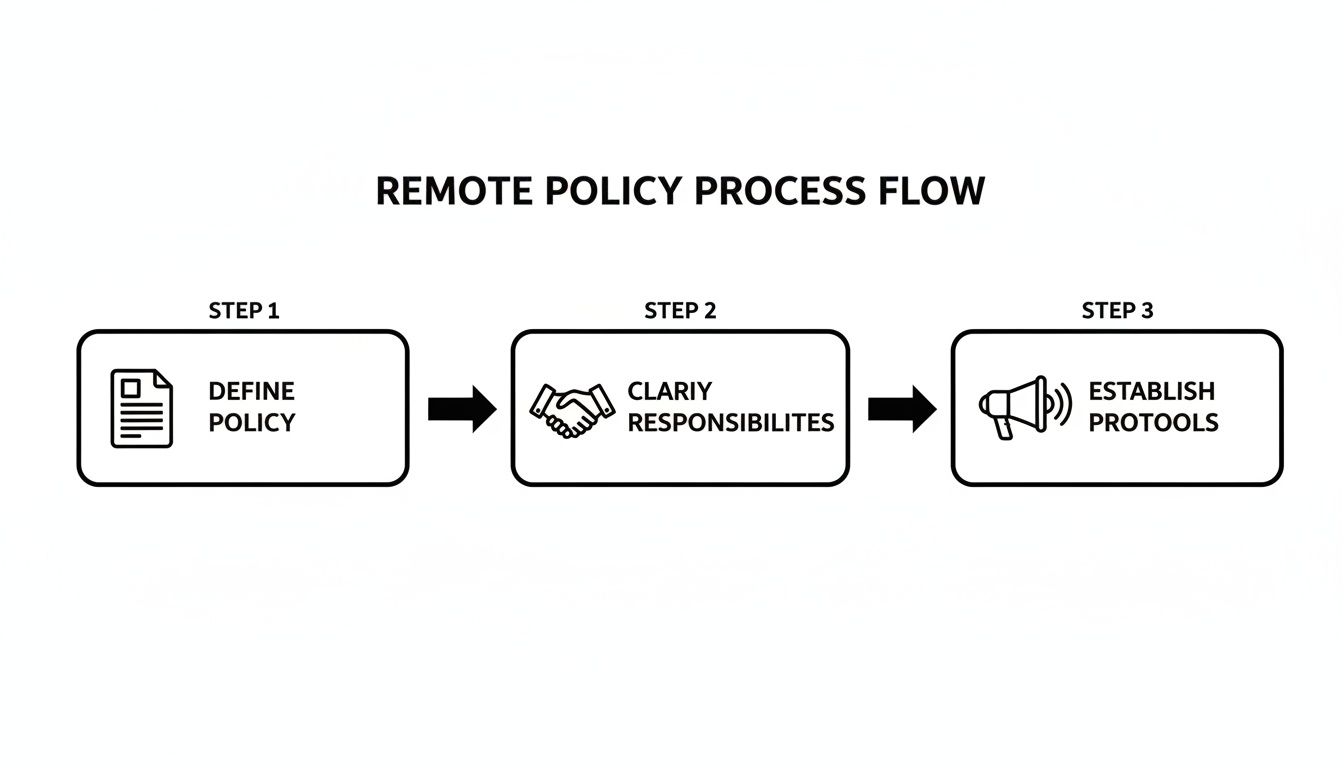
Defining your rules, clarifying who does what, and setting clear protocols—this simple foundation is what makes your safety technology truly effective.
From a Simple Alert to Actionable Intelligence
Today’s remote worker support platforms are far more than just panic buttons. They’ve evolved to provide a rich stream of information that gives emergency responders the full picture.
When an SOS is triggered, the system doesn’t just send a pin on a map. It delivers a bundle of critical data, including:
- The worker’s last known location and direction of travel.
- The type of alert (manual SOS, man-down, or missed check-in).
- The employee’s profile, including emergency contacts or vital medical notes.
- Site-specific details like access codes, hazards, or floor plans.
This is the kind of detail that shaves precious minutes off an emergency response. It gives a 24/7 monitoring team everything they need to verify the incident, coordinate with local first responders, and guide help directly to the person who needs it. This is how technology closes the loop, turning your well-thought-out policy into a life-saving action.
Integrating 24/7 Professional Emergency Response
So you’ve equipped your remote workers with a safety app or device. That’s a great start, but it’s only half the battle. An alert is only as good as the response it triggers. If an SOS comes through at 2 AM on a Saturday, who is awake, trained, and ready to jump into action?
This is where a professional, 24/7 emergency response service isn’t just a nice-to-have—it’s the critical link that makes your entire safety program work.
Many businesses initially consider handling alerts in-house. On the surface, it seems like a simple way to save money by having a manager or an internal team field them. I’ve seen this approach time and again, and it’s almost always a mistake. You’re left wrestling with inconsistent availability (who’s on call on holidays?), a serious lack of crisis-specific training, and the immense emotional toll these events can take on your people.
A dedicated monitoring center is a completely different world. These centers are staffed around the clock with agents whose entire job is crisis management. They are trained to stay calm under pressure, verify what’s happening, and coordinate an immediate and accurate response with local emergency services.
The Power of Professional Monitoring Agents
When an alert fires, a professional monitoring agent sees much more than a red dot on a map. They receive a full packet of data from the safety app, giving them instant context to manage the situation effectively.
What they see includes:
- Worker Information: The name and role of the person in distress, along with any vital medical information they’ve pre-registered.
- Alert Type: Was this a deliberate panic button press, an automated alert from a fall, or a missed check-in?
- Location Data: Pinpoint GPS coordinates that are essential for getting help to the right place.
- Site Details: Any pre-loaded notes you’ve provided, like gate codes, known hazards on a property, or specific entry instructions for a large building.
This live data turns a simple alarm into actionable intelligence. The agent’s first move is always to try and contact the worker. This two-way communication is crucial, as it helps filter out the 98% of alerts that turn out to be false alarms, preventing costly and unnecessary 911 dispatches.
If the worker is unresponsive or confirms the emergency is real, the agent escalates immediately. They have direct lines to 911 and other emergency dispatchers, and they provide all the critical details clearly and concisely. An untrained, panicked manager simply can’t guarantee that level of calm, professional communication.
An experienced monitoring agent can cut through the chaos of a crisis. They know what first responders need to hear and how to convey it, shaving precious minutes off the response time when every second is critical to the outcome.
Guiding Responders with Precision
Let’s get practical. Imagine a technician has a medical emergency inside a massive industrial complex. Just giving the 911 operator a street address is practically useless—it could take first responders ages to find them.
This is where a modern platform shines. When integrated with a monitoring center, technologies like Bluetooth beacons can pinpoint an employee’s location down to a specific floor or even the exact room.
The monitoring agent can then tell the 911 dispatcher, “The worker is on the third floor, in the northeast corner, maintenance room 3B.” That’s the kind of detail that guides help directly to the person in need, bypassing the confusion that could otherwise cause a fatal delay. If you want to see exactly how these events unfold, you can learn more about the steps of a lone worker emergency.
Closing the Loop with Compliance Ready Reports
A professional monitoring service’s work isn’t done when the ambulance pulls away. Once the incident is resolved, they compile a detailed report that serves as the official, unchangeable record of the event.
This documentation captures the entire timeline from start to finish:
- The exact time the alert was triggered.
- A log of all communication attempts with the worker.
- The time emergency services were dispatched.
- A record of every action the monitoring agent took.
- The final outcome and resolution of the incident.
This kind of documentation is invaluable. It gives you a bulletproof audit trail for compliance, provides concrete data for post-incident reviews to strengthen your safety protocols, and serves as a factual foundation for any insurance or legal matters. By integrating a 24/7 response center, you complete your safety ecosystem, ensuring every alert gets an expert, reliable, and fully documented response, no matter when it happens.
Driving Adoption Through Training and Culture

You can invest in the slickest safety tech on the market, but it’s just an expensive paperweight if your team won’t use it. The real work begins after the technical rollout. It’s all about people and building a culture where safety feels like a partnership, not another rule to follow.
Getting there means you need champions, and they have to come from the top. When managers and field supervisors are the first to adopt the system and openly talk about its value, it sends a clear signal. This isn’t just another corporate mandate; it’s a shared commitment to keeping everyone safe. That’s how a new tool becomes second nature.
Build Confidence with Scenario-Based Training
Forget the generic feature walkthroughs. They’re boring, and they don’t stick. People need to see exactly how this technology helps them in situations they might actually face. Your training has to be built around their reality.
Think about a field technician working alone. Instead of just listing features, have them practice:
- A Simulated Fall: Show them what happens from start to finish when the man-down detection is triggered.
- An SOS Drill: Run through the steps of sending a manual alert if they encounter a threatening situation.
- A Pre-Entry Check-in: Walk them through using the scheduled check-in before entering a remote or hazardous site.
This hands-on approach builds muscle memory and, more importantly, trust. Your team will know the system has their back when it counts. For a dispersed workforce, staying sharp is everything, which is why it pays to focus on modern methods for transforming employee training.
Tackle Privacy Concerns and Foster Trust
Let’s be honest: the moment you mention a new safety app, some employees will immediately think “Big Brother.” It’s a huge, and understandable, hurdle. The only way over it is with complete transparency.
The goal is to make safety feel supportive, not invasive. Communicate that location tracking is only active during an alert or missed check-in. Emphasize that this is about getting help to them in an emergency, not monitoring their every move.
When you frame the program as a benefit—a safety net designed to protect them—you fundamentally change the conversation from surveillance to support. This builds the trust you need for a healthy safety culture.
With 76% of workers saying they would consider quitting if remote work options were taken away, a robust support program shows you’re invested in their well-being. It becomes a powerful retention tool that helps you stand out. You can explore in more detail with these remote work statistics. Ultimately, getting people on board isn’t about enforcing rules; it’s about creating a shared sense of responsibility for everyone’s safety, wherever they are.
Got Questions About Remote Worker Support? We’ve Got Answers.
As you start piecing together your remote worker support program, some tough questions are bound to come up. We get these all the time from operations and safety leaders, so let’s tackle the big ones head-on.
How Can We Support Remote Workers Without Being ‘Big Brother’?
Let’s be honest, the “Big Brother” concern is real and can stop a program in its tracks if you don’t address it directly. The key is to frame this as a safety net, not a surveillance tool.
Modern, well-designed systems aren’t about watching your team’s every move. Think of it more like a silent alarm—it only makes noise when someone pulls the cord. Location data, for instance, should only become visible to a monitoring team after an employee triggers an alert or misses a scheduled check-in. It’s not about tracking their lunch break.
The best way to get buy-in is through total transparency. During training, show them the app. Trigger a false alarm and walk them through exactly what the response team sees on their dashboard. When they see that location data only appears after an alert is sent, that personal demonstration builds more trust than any policy document ever will.
The conversation has to shift from surveillance to safety. When employees see the system as a lifeline that gets them help in a crisis, it feels like a genuine benefit, not an intrusion. That mindset is how you build a culture of shared responsibility.
What’s the First Step If Our Budget Is Limited?
What if you don’t have a blank check for this? That’s the reality for most of us. Your most powerful first move here doesn’t cost much at all: a thorough risk assessment.
This isn’t just paperwork; it’s your strategic roadmap. A good assessment will clearly show you which roles face the highest risks—maybe it’s the lone field technician in a rural area or the community health worker making home visits after dark. Now you have hard data.
Armed with that information, you can stop guessing and start targeting your resources effectively. You can build a rock-solid business case for a bigger budget next year, showing exactly where the safety gaps are. In the meantime, you can focus on a scalable, cost-effective solution—like a smartphone-based safety app—for that highest-risk group first.
How Do We Keep Safety Standards Consistent for a Global Team?
Managing safety across different countries, time zones, and cultures can feel like herding cats. The only way to truly standardize your approach is with a centralized platform.
Look for a single solution that works globally but is managed from one dashboard. This allows you to set a single, coherent safety policy and emergency response protocol that applies to everyone, whether they’re in London or Lisbon.
You’ll also want features like bulk communication tools. Imagine needing to send an urgent weather warning or security update—a centralized system lets you push that out to every single employee at once. Plus, having all your data in one place gives you a single source of truth for reporting, so you can see how you’re performing across all regions and ensure no team gets left behind.
Ready to turn your remote worker support strategy into reality? Gameo Pro transforms any smartphone into a professional-grade safety device, complete with 24/7 expert monitoring. Learn more about how Gameo Pro can protect your team.